CabuzTime

DCAA-aligned timekeeping for QuickBooks government contractors

CabuzTime helps small government contractors using QuickBooks control labor charging with authorized charge codes, daily time entry, employee certification, manager approval, correction history, labor reports, and payroll/accounting export readiness.

  • Daily entry, employee certification, and manager approval
  • Admin-controlled charge access with effective dates
  • Correction history, labor reports, and export readiness

Labor control layer

QuickBooks stays the accounting system. CabuzTime controls the labor record.

QuickBooks is where finance manages accounting. CabuzTime sits around the daily labor workflow so employees charge only allowed work, certify their time, managers approve it, and finance exports approved records with the history attached.

Entry evidence
Who entered time, when it was entered, and which charge code or cost objective was used.
Review evidence
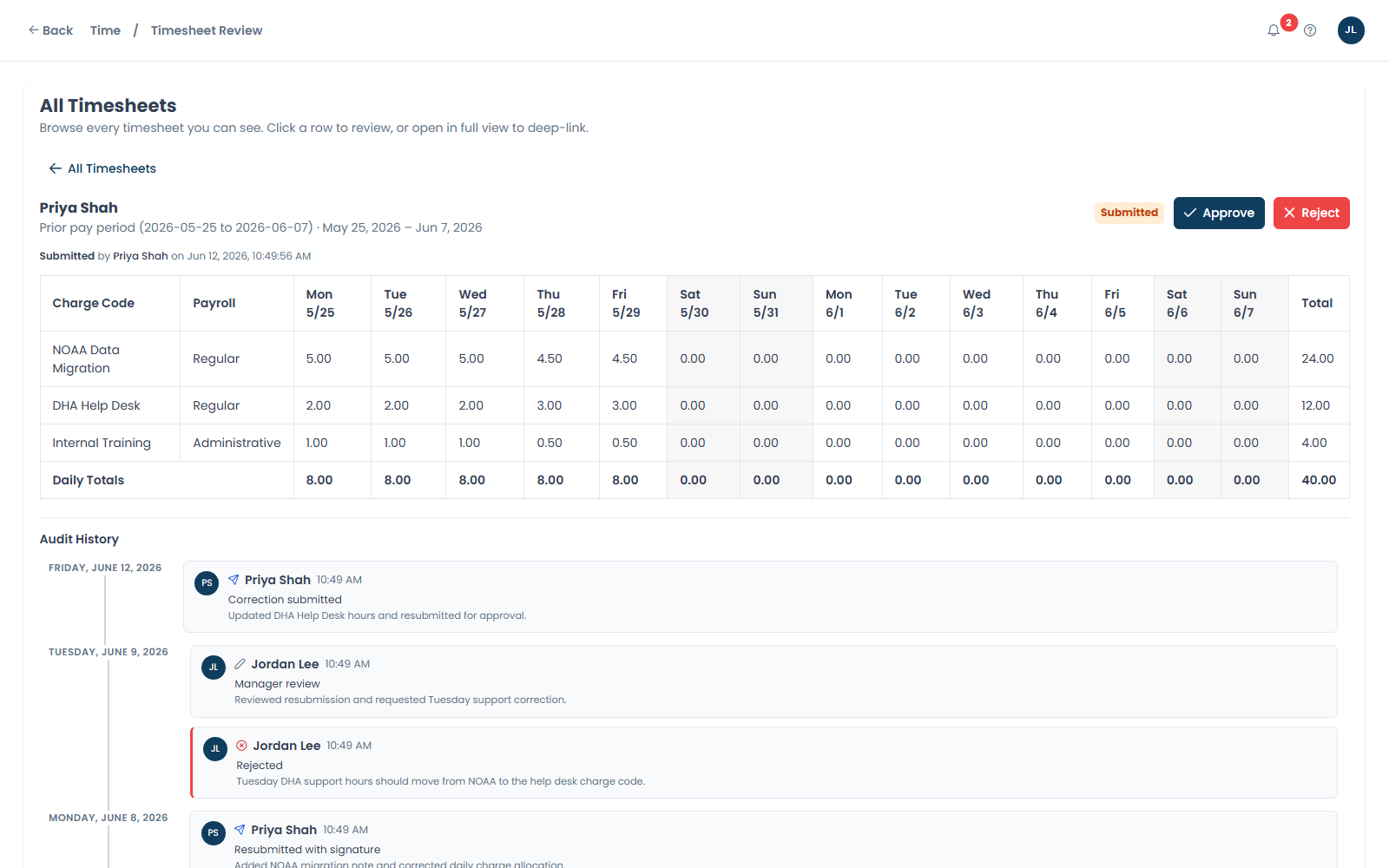
Employee certification, manager approval, return/rejection history, and correction reasons.
Export evidence
Labor reports and downstream payroll/accounting exports start from approved records.

Product workflow

Setup, daily entry, approval, corrections, and export readiness.

CabuzTime is designed around the routine work a small GovCon team needs every pay period, without forcing a heavyweight ERP process.

Setup

Configure employees, pay periods, jobs, projects, charge codes, and payroll mappings.

Admins set the operating structure before employees start charging time.

Authorization

Assign employees to allowed charge codes with effective dates.

Employees see the work they are allowed to charge for the relevant period.

Daily entry

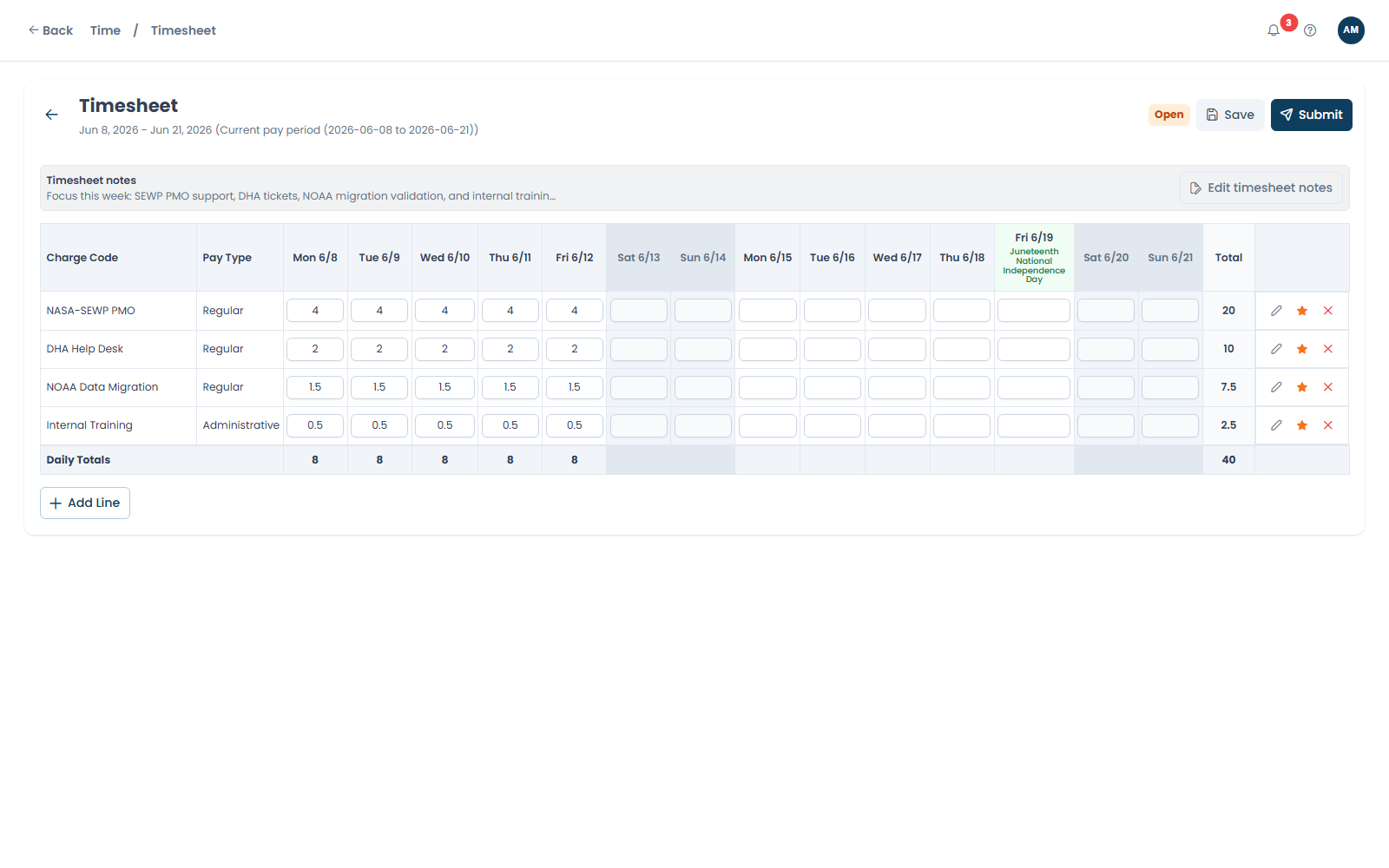
Employees enter time each day against the right work.

Daily entry keeps missing days visible before payroll and reporting deadlines.

Certification

Employees certify and submit their timesheets.

The submitted record preserves employee attestation as part of the workflow.

Approval

Managers approve, reject, or return time for correction.

Review decisions stay attached to the timesheet record.

Corrections

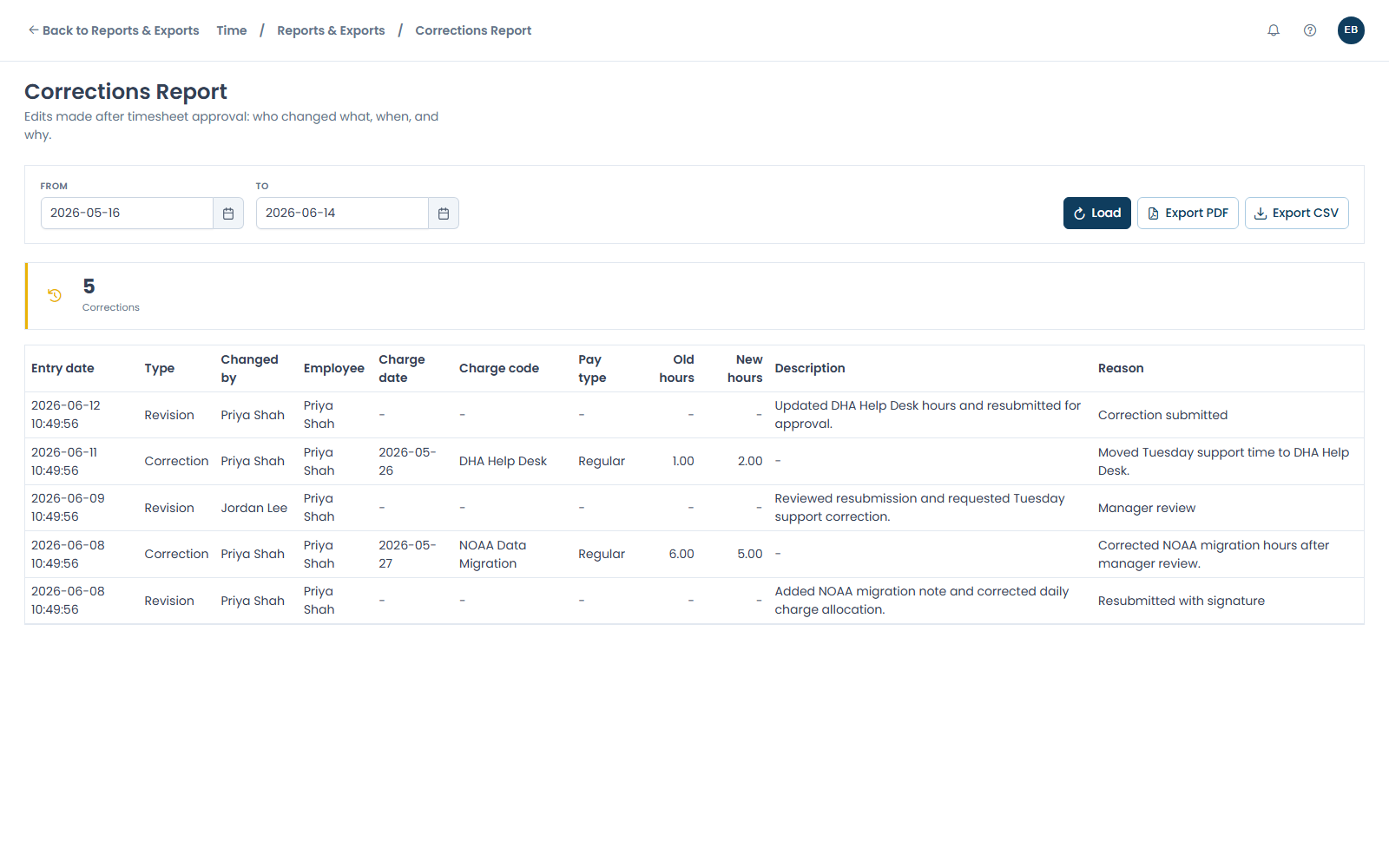
Corrections preserve the history and reason.

Changes are visible as part of the audit-ready timekeeping record.

Outputs

Approved time flows to payroll, exports, and labor reports.

Finance works from approved source records instead of rebuilding time in spreadsheets.

  1. Current launch surface

    Time setup, reports, approvals, and exports stay in the Time module.

    Admins can reach the core setup and reporting surfaces from the Time home area without switching systems.

  2. Approved-record exports

    Export readiness starts with approved time records.

    Payroll and accounting export workflows are downstream of the CabuzTime approval record, including QuickBooks Desktop IIF where configured.

Built-in controls

The timekeeping controls are part of normal work.

CabuzTime focuses on the common workflow: enter, certify, approve, correct, report, and export.

Authorized charge codes

Employees charge the jobs, projects, and labor categories admins assign for the relevant dates.

Daily time entry

Daily entry and missing-day visibility keep pay periods from becoming end-of-week cleanup.

Employee certification

Employees certify their time before manager review and payroll/accounting output.

Manager approval

Managers approve, reject, or return timesheets while review history stays attached.

Correction history

Corrections preserve the change reason and record history instead of silently overwriting time.

Payroll/export readiness

Approved records support labor reports and downstream payroll/accounting exports.

QuickBooks workflows

CabuzTime prepares approved labor records for downstream QuickBooks and payroll workflows.

CabuzTime does not replace QuickBooks. It creates the approved labor record before finance moves time into accounting, payroll, or export workflows.

Time controls

Allowed charge codes
Employee certification
Manager approval

CabuzTime

Approved labor records

Corrections Reports Exports

Configured paths

QuickBooks Online

Configured Online handoff

Approved time can support a QuickBooks Online sync path after setup and mappings are in place.

QuickBooks Desktop

Configured Desktop file handoff

Approved time can support a Desktop file workflow when the account setup supports it.

Teams use the QuickBooks path that matches their accounting setup.

Who it fits

Built for small and mid-sized government contractors already using QuickBooks.

CabuzTime is for teams that need stronger labor controls, audit-ready records, approval history, correction history, labor reports, and export readiness without adopting a heavy GovCon ERP.

Best fit
Small and mid-sized contractors that need one obvious timekeeping workflow.
Accounting posture
QuickBooks remains the accounting system while CabuzTime controls the labor record.
Larger teams
Contact us for 50+ users if rollout planning matters.

Pricing

$6 / user / month

No contracts. Self-serve via Stripe. Cancel anytime.

  • Daily entry, employee certification, and manager approval
  • Admin-controlled charge access with correction history
  • Labor reports and downstream payroll/accounting export readiness
  • Contact us for 50+ users

Common questions

What teams ask before adopting CabuzTime.

Does CabuzTime replace QuickBooks?

No. QuickBooks remains the accounting system. CabuzTime controls daily labor entry, approval, corrections, reporting, and export readiness before approved records move downstream.

Does CabuzTime support QuickBooks Online?

CabuzTime can support QuickBooks Online TimeActivity workflows where the account, mappings, and setup are configured for that path.

Does CabuzTime support QuickBooks Desktop?

CabuzTime can support QuickBooks Desktop through IIF export workflows where the account setup and exact-name mappings support that path.

How should we describe the DCAA angle?

Use DCAA-aligned, audit-ready, or designed to support DCAA expectations. CabuzTime helps preserve daily entry, approvals, correction reasons, and approved-record exports, but no software can guarantee an audit outcome.

How does CabuzTime support labor audit readiness?

CabuzTime records daily time entry, admin-controlled charge access, approvals, correction reasons, and approved-record exports. Formal authorization evidence can be strengthened with Cabuz Workforce where enabled.

How do QuickBooks Online and Desktop handoffs differ?

QuickBooks Online setup is designed around a single in-app sync path for approved time after connection and mapping. QuickBooks Desktop uses an IIF file workflow: CabuzTime prepares an IIF export for Desktop import where configured.

Start with the timekeeping record

Put daily labor, approvals, corrections, reports, and exports in one system.

CabuzTime is purchase-forward for small teams, with contact support available for setup questions and larger rollouts.